What is Ledger Nano S Plus: Cryptocurrency
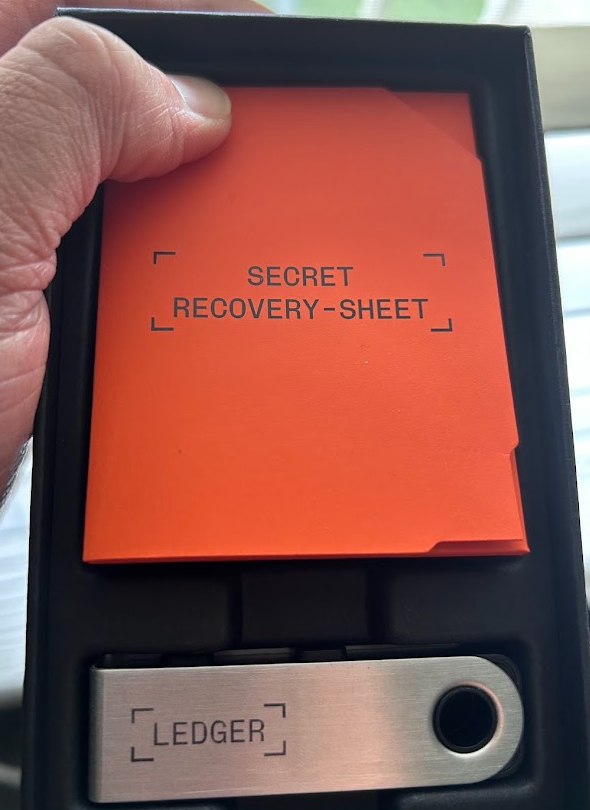
Almost a year after we won the MLH Best Use of Solana track at HackNYU, I received the Ledger Nano S Plus and wondered what exactly the tool was. From my first instinct, it looked like a USB, but with a small screen. After a little research about cryptocurrencies, I kept hearing the phrase, "Not your keys, not your coins." But what does that mean exactly?
What is the Ledger Nano S Plus?
A Ledger Nano S Plus is a hardware wallet that stores your cryptocurrency safely at its core. That is the soft definition, and the term "hardware wallet" has a broader meaning, so let’s start with how crypto actually works.
When I say it "stores your cryptocurrency," a lot of us think it might be like a USB drive that stores all the digital coins physically inside the device. This is not true; in fact, the crypto is not stored in the hardware or your computer at all. All crypto lives on the blockchain (across various distributed computers). To access, manage, or move your crypto on that blockchain, you need a private key, which is basically a complex mathematical password. This Ledger is a highly secured device that stores your private keys completely offline and keeps them away from hackers, malware, and the internet itself.
I did a little research on the company behind it. Ledger is a computer and network security company based in Paris, France. They are a massive player in the space—they have sold over 7.5 million devices globally and claim that roughly 20% of the world’s crypto assets are secured by their hardware.
Getting Started:
After unboxing, I connected the device to my PC, and the setup process immediately started. The first thing it prompted me to do was create an 8-digit PIN. This was done via the two physical buttons on top of the device, where clicking both buttons at the same time acts as the "Enter" or confirmation key. Right after confirming the password, the magic happened.
The 24-Word Recovery Phrase: How it Works and Why it Matters
After setting the PIN, the tiny screen generated a sequence of 24 random words. I was instructed to write them down in exact order on a piece of paper provided in the box. Here is exactly what happened during this step, and why it is so critical: What actually happened? The device’s internal computer chip was generating my "Master Private Key." Instead of giving me a string of 256 random numbers and letters(more on this), it translated that code into 24 readable English words.
Where is it stored?
These words were generated offline, right inside the device. They were never displayed on my computer monitor, and they never touched the internet.
How it confirms?
To ensure I didn’t write down a typo, the Ledger made me verify the phrase. It quizzed me by asking, "What is word #17?" and I had to scroll through options on the device to select the correct one.
Why is it necessary?
If my Ledger gets lost or I threw it in the river, my crypto isn't gone. I can simply buy a brand new Ledger (or use any other standard hardware wallet), type in those exact 24 words, and all my accounts and balances will be instantly restored. Those 24 words are my crypto.
More on this magical 24 words
Those 24 words aren't just a simple password; they are a direct translation of a massive, unique master number (often called a "seed" or "entropy"). Because humans are terrible at accurately writing down a 256-character string of random 1s and 0s without making mistakes, the crypto industry created a universal standard (BIP-39) that converts that raw computer data into 24 readable English dictionary words.
Hardware wallets use a cryptographic system called Hierarchical Deterministic (HD) key derivation. "Deterministic" is the magic word here. In computer science, a deterministic formula means that if you provide the exact same input, you will get the exact same output, 100% of the time, forever. When you type those exact 24 words into a new Ledger, the device's internal computer chip runs them through this strict mathematical formula. Because the formula is open and standardized across the entire crypto industry, the new Ledger mathematically calculates the exact same list of private keys and public receiving addresses that your old Ledger originally generated.
Why Use a Ledger When We Have Third Party Apps?
I thought about this even before unboxing the device. If apps like Coinbase, Robinhood, and Webull Pay allow you to buy, sell, and hold crypto so easily, why go through the hassle of buying a physical device?
Here is the difference: When you buy Bitcoin on Robinhood or Webull Pay, you don't actually own the private keys. The company holds the keys on your behalf. They are essentially acting as a bank. While this is convenient, it introduces third-party risk:
- What if the exchange gets hacked?
- What if the company goes bankrupt?
- What if they decide to freeze your account?
With a Ledger, you bypass the middleman entirely. It solves the problem of trust. You don't have to trust a corporation to keep your funds safe; you are your own bank. It is more like you have your money, and you bought a highly secure safe box to keep it in. The cool part is, if you lose that physical safe box, you can always buy a new one, enter your previous combination (the 24 words), and your money is right there.
Moving Your Crypto: From Third Party to You
So, if you already have crypto sitting on a platform like Coinbase, how do you actually use the Ledger? It’s surprisingly simple. Through the Ledger Live app on your computer, your Ledger generates a unique "receiving address" like a bank account number. You simply log into Coinbase, click "Send," paste your Ledger's address, and hit confirm.
What happens next is the ultimate shift in ownership. The crypto doesn't physically travel through the USB cable into your device. Instead, the blockchain updates its public ledger to your specific ledger wallet. Coinbase is no longer holding your crypto—you are. You have officially taken self-custody.
Beyond Storing: Buying and Selling Directly
You might be wondering, "If I take my crypto off an exchange, how do I ever sell it or buy more?" The great thing is that you don't even need third party apps anymore if you don't want to use it. The Ledger Live companion app has built-in partners that allow you to buy and sell crypto directly. You can use your credit card or bank account to buy coins, and they are deposited straight into your hardware wallet's custody. When you are ready to cash out, you can sell directly from the Ledger app, and the money gets sent straight to your bank account. Everything can be managed from one secure place.
The Tedious vs. The Secure
Using the Ledger Nano S Plus isn't as buttery-smooth as opening an app on your phone and the ledger nano S plus is not even supported in iPhone so you need to use PC.
The Tedious Part: What I found slightly annoying is the inactivity timeout. If you leave the device plugged in and step away for a few minutes, it locks. To do anything, you have to physically click through and re-enter your 8-digit PIN on the tiny device. Doing this repeatedly can feel tedious.
The Brilliant Part: I quickly realized that this tediousness is a feature. I love how everything is in my control. Even if a hacker fully takes over my computer and tries to drain my wallet, they can't. Nothing happens unless you physically press both buttons on the Ledger device to approve the transaction.
Is the Ledger Nano S Plus for everyone? If you only hold $50 worth of Dogecoin, it might be overkill. But if you are starting to accumulate a meaningful amount of cryptocurrency, the peace of mind that comes with physical, offline security is unmatched. Yes, entering a PIN on a tiny screen takes a little patience, but the absolute control you gain over your financial assets is completely worth it.
No comments yet
Sign in to leave a comment.