From Vector Search to Page Indexing: Rebuilding our Semantic Search Pipeline
Introduction
Semantic search has become the bedrock of modern document intelligence. Like many engineering teams, we initially adopted the industry-standard architecture: a classic vector-based RAG (Retrieval-Augmented Generation) pipeline. The process was straightforward: extract text from documents, chop them into chunks, generate embeddings, store them in a vector database (like FAISS) or Qdrant , and retrieve answers using cosine similarity. For our senior capstone project, we used the same approach using Blazor WebAssembly, Asp.net WebAPI and we also built a prototype for Semantic Search using python and NextJs While this approach worked initially, it hit a ceiling as our requirements grew. When we moved into multi-document search, complex legal contracts, and financial reports, the "cracks" in the vector-based foundation became impossible to ignore. Query misunderstandings and broken summaries pushed us to rethink our strategy, leading us to experiment with a new paradigm: Page Indexing.
Our Last Iteration: Vector-Based Semantic Search
Our original system relied on the core primitives of semantic search—intent and context. Unlike keyword engines that look for literal string matches, semantic search uses Natural Language Processing (NLP) and Machine Learning to infer what a user actually means. At the heart of this were embeddings: high-dimensional numerical vectors that represent text in a continuous space. By using Sentence Transformers, we could represent "JavaScript" and "code" as vectors living close together, while "coffee" lived far away. To find answers, we measured the angle between the user's query vector and our document chunk vectors, a process known as cosine similarity.
Where Vector Search Started Breaking
-
Query Misinterpretation: Contracts and financial reports are not just flat piles of text; they are hierarchies of sections, subsections, and tables. Vector search ignores this structure. A query about "payment terms" might retrieve loosely related sections about "fees" from the appendix simply because the vocabulary is similar, missing the actual "Terms" section entirely. We tried adding metadata like page numbers, but it improved traceability without actually improving the AI's reasoning.
-
Summary Generation: Summarization failed because cosine similarity tries to match the word "summary" instead of understanding "summarize the document" as an intent. So we had to build a separate summarization pipeline, increasing complexity, latency, and cost.
-
The Chunking Rabbit Hole: We spent days trying to make text chunks semantically meaningful. We moved away from fixed 600-character windows which often cut sentences in half to Semantic-Aware Chunking. We wrote complex regex to detect headers like "1. Termination" and introduced Adaptive Chunk Lengths to reduce fragmentation. Finally, we added Metadata Tagging so each chunk carried its "DNA" (Section Title, Clause Number). While this helped, it created a high-maintenance pipeline where every new document layout threatened to break our rules.
-
The Embedding Quality Trap: Once we had the chunks, we had to fix how they were represented. Our old model (all-MiniLM) was fast but "legal-illiterate." It didn't truly grasp the nuance of an indemnity clause versus a liability limit. We spent days Model Benchmarking, testing everything from nomic-embed-text to bge-large-en-v1.5. We even added Embedding Normalization (L2-normalization) to ensure consistent cosine distances in our vector database (Qdrant). Even with the improvements, we were still just polishing a fundamental flaw. No matter how good the embedding model was, it was still trying to find answers based on mathematical "vibes" rather than the actual structural logic of the document.
The Document Comparison Problem
The biggest hurdle was our Comparison Feature. We wanted users to compare two contracts and find specific differences (e.g., "Document A says 30 days, Document B says 60 days"). Even with a strict system prompt and plural detection logic, the results were hit or miss. The Problem was the vector search would often "mix" evidence. It would retrieve chunks from both documents, and the LLM would struggle to keep track of which was "Document 1" and which was "Document 2," leading to hallucinations or vague summaries rather than specific, searchable details.
Finding of Page Indexing
The core issue wasn’t tuning thresholds, better embeddings, or better prompts. The real issue was this: Vector similarity is not reasoning. It matches meaning but it doesn’t understand structure, hierarchy, intent, or document logic.
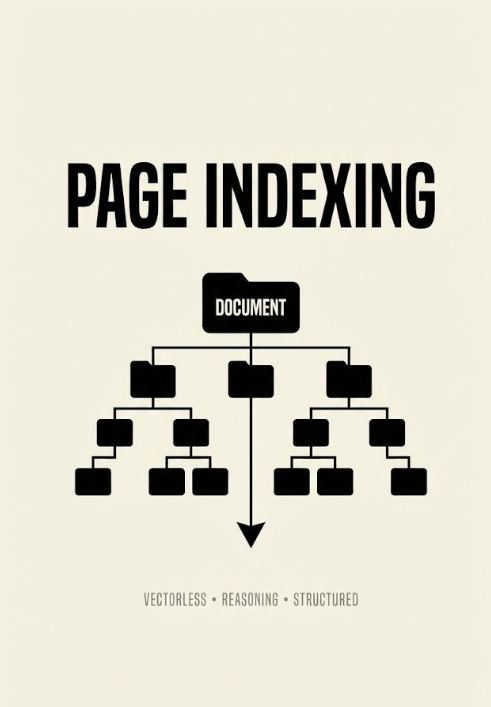
Unlike traditional RAG, PageIndex is vectorless. It doesn't care about "mathematical distance." Instead, it simulates how a human expert reads a document. It builds a Tree-Structured Index. Instead of chopping the document into random 500-word blocks, it understands the hierarchy:
- Root: The Document
- Node: Chapter 1
- Sub-node: Section 1.1 (Introduction)
- Sub-node: Table 1.2 (Financials)
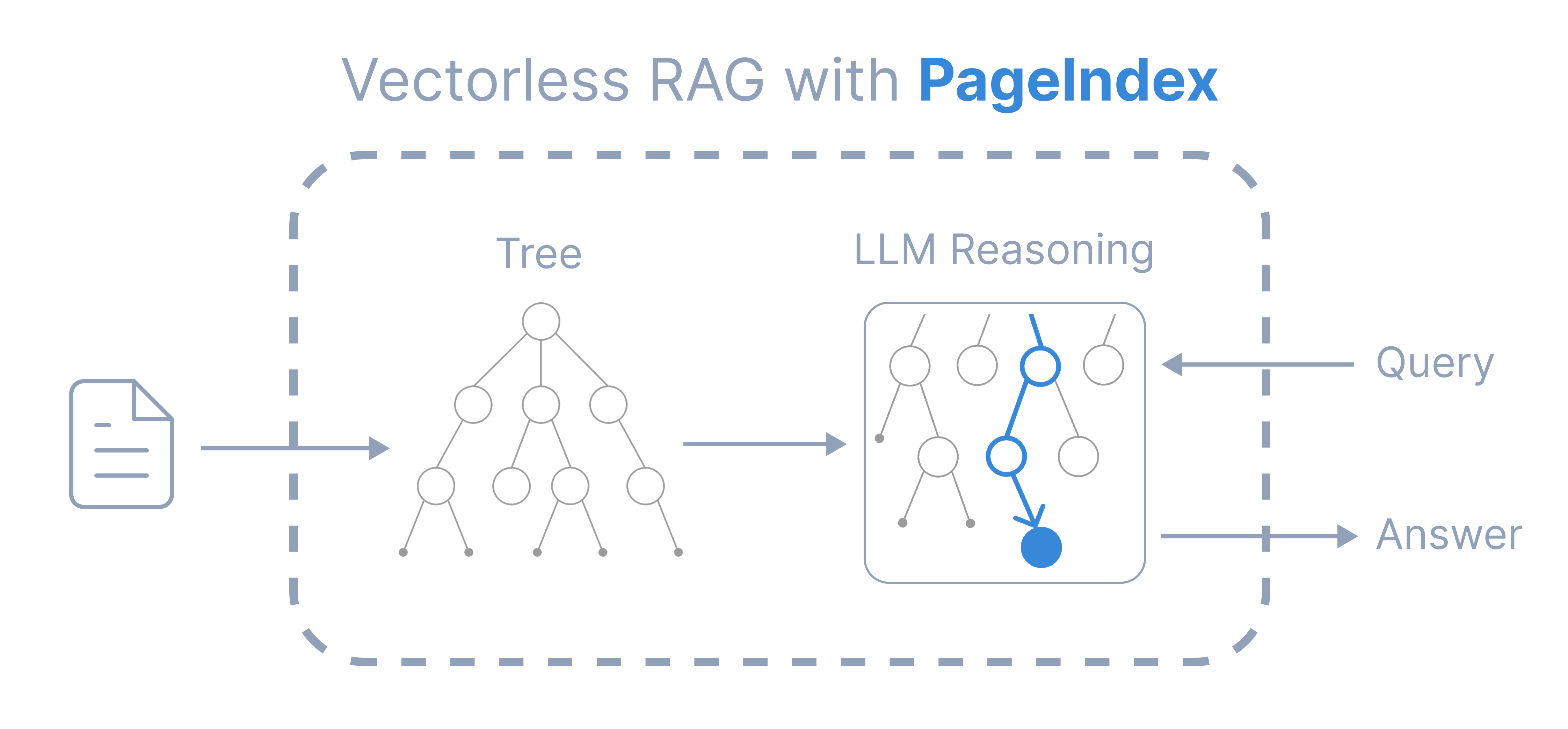 Image Source: Page Index Documentation
Why will this solve some of the problems for Us?
No More Chunking: We stopped worrying about whether a chunk was too small or too large. PageIndex navigates the document structure naturally.
Agentic Reasoning: When we query the system, an AI agent actually "traverses" the tree. It identifies the relevant headers, reads the tables correctly, and understands the relationship between sections.
Traceability: Because it's based on structure, the "citations" are much more accurate. We can highlight the exact structural node instead of a random string of text.
How We Refactored Our Architecture In Our Prototype Project ?
The transition allowed us to simplify our codebase significantly. We moved from a complex local pipeline to a more "Agentic" approach.
The Old Way (The Vector Approach):
Service: pdfplumber - NLTK Chunking - Sentence Transformers - FAISS Index. Search: Encode Query - Search FAISS - Pass Chunks to Ollama.
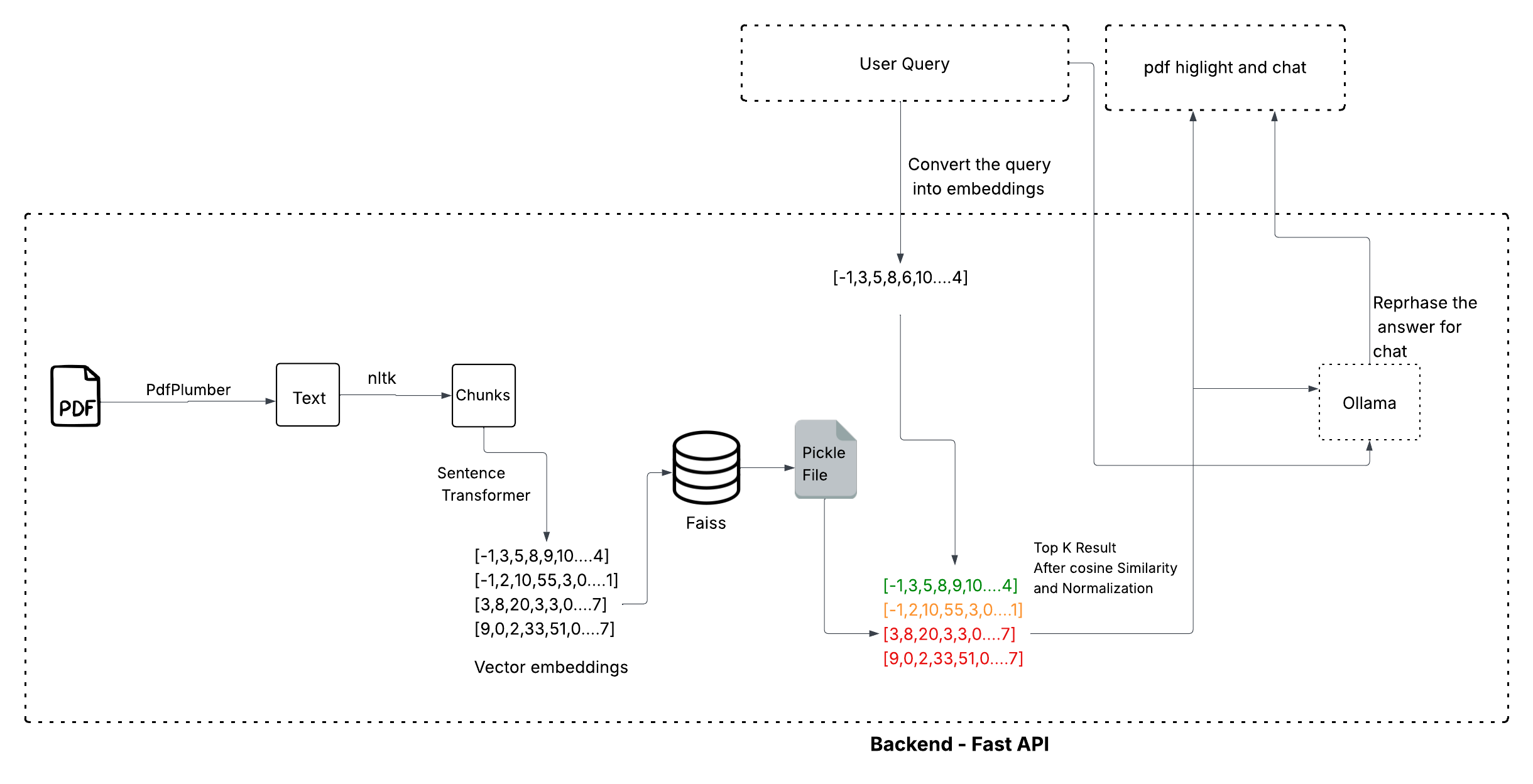 Fig: Vector Search Architecture
The New Way (The Structural Approach):
Service: Upload PDF - PageIndex (Tree Generation).
Search: Query - PageIndex Agent (Structural Reasoning) - Final Answer.
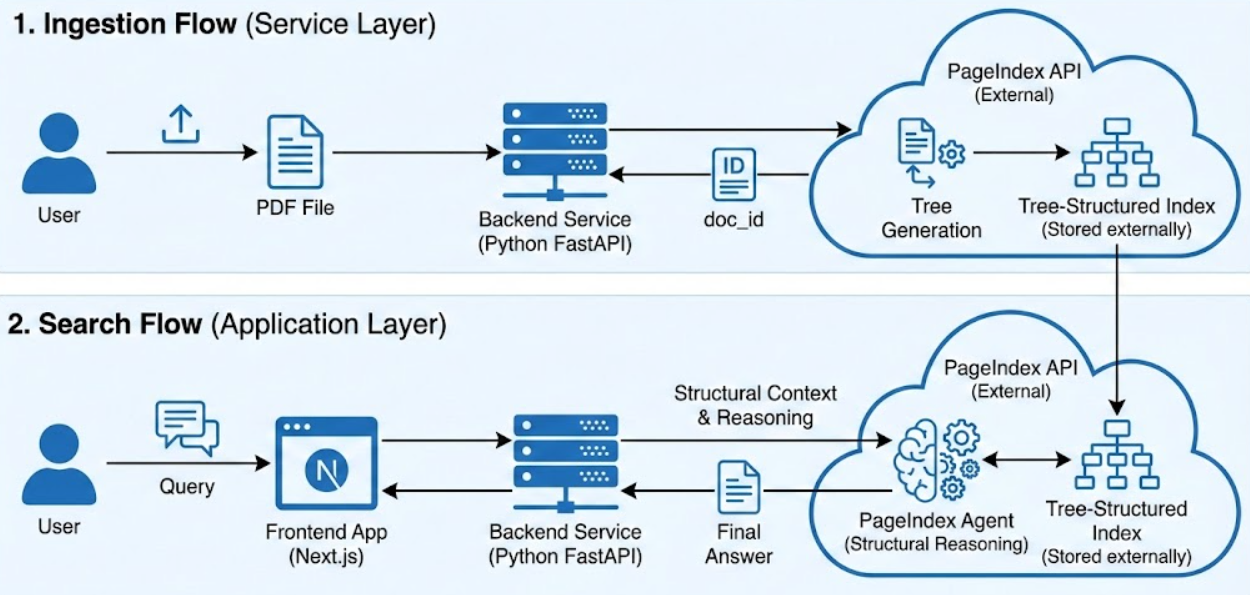
Fig: Page Indexing Architecture
Why We Tried It?
-
Speed Page indexing was extremely fast. Our vector system relied on Local Ollama models, Local embedding models, Hardware and memory Constraints. Page indexing removed Embedding latency, Vector DB Queries and Similarity Computation and led to lower system complexity and faster retrieval.
-
Multi-Document Support Built-in multi-document handling was clean and simple:
  "doc_id": ["pi-123456", "pi-789012"],
  "messages": [
    {
      "role": "user",
      "content": "Compare these documents"
    }
  ],
  "stream": false
}
This solved one of our hardest problems: cross-document reasoning without cross-document contamination.
Results and Limitations
Testing Page Indexing on our Python/Next.js prototype showed immediate improvements in structural answers and legal reasoning. We no longer saw "chunk fragmentation," and retrieval was extremely fast because we removed the latency of local embedding models and similarity computations. However, it isn't a silver bullet. Because Page Indexing requires an external API (pageindex.ai), it introduces a third-party dependency that a fully local Vector RAG (like our Ollama/FAISS setup) doesn't have. For regulated industries with strict data compliance, this is a non-trivial consideration. Our Senior Capstone, Project was for HealthCare Organization where data protection is key and it seems not perfect suit to use this architecture for them.
Conclusion
Our experiment taught us a vital lesson: Similarity is not understanding. If your documents have a structure and most professional documents do, "don't treat them like a flat pile of words". By respecting the hierarchy through Page Indexing, we moved from an AI that just "found words" to an AI that finally understands the logic of the document.
References:
No comments yet
Sign in to leave a comment.